
Editable Canva Template for Real Estate Agents
Listing Presentation for Realtors
Walk into the listing appointment with the pricing conversation already built.
Most listing presentations open with the agent. This one opens with the seller’s move, their home and what the market actually paid, and gets to your credentials only after the pricing case has been made.
It comes as two Canva templates built from one master: a 16:9 deck you present on screen and an 8.5 × 11 leave-behind for the kitchen table. Editable in Canva, and it works with Canva Free.
18-page print + 19-slide deck · Canva Free · Instant download
Best for listing agents who would rather present evidence than credentials
You want the pricing conversation to happen on evidence, in front of the seller, and you want to leave behind something that says the same thing.
A good fit if you:
- present on a laptop or tablet at the appointment and still want a printed copy on the table
- meet sellers who already have a number in mind and have not been shown where it came from
- pull your own comps and want a page built to present them
- are building a proof path without a long sales history — the track-record page has an alternate for that
Not ideal if:
- you want the analysis done for you — it is a template, not a market analysis, and it does not include a completed CMA
- you need brokerage-specific agency or disclosure language — that comes from your own forms
The seller’s move first, the pricing case next, your track record last
Two editable Canva templates: an 8.5 × 11 portrait leave-behind, 18 pages presented and 21 in the file, and a 1920 × 1080 slide deck, 19 slides presented and 22 in the file. The extra pages are alternates, not extra presentation.
Their move and their home
- Cover and agenda
- Tell me about the move (write-on)
- What buyers will love about this house
- Your market, right now
- Where the market puts your home: the comps and a value range
Pricing and the plan
- Three ways to position
- Why starting high can cost you
- Our launch position, filled in together
- How buyers find your home
- What my marketing looks like
- Showings that respect your life
How you work, and what’s next
- You’ll hear from me two ways
- From listed to closed
- The short version of my track record
- The questions every smart seller asks
- The fee, plainly
- When you say yes, the first week
Every conversation page starts with complete default copy, so you are editing rather than drafting. A Quick Start Guide with both template links comes with the download.
Two files, each composed for its shape
Both files carry the same content in the same order, built from one master, so nothing is stretched or cropped to fit.
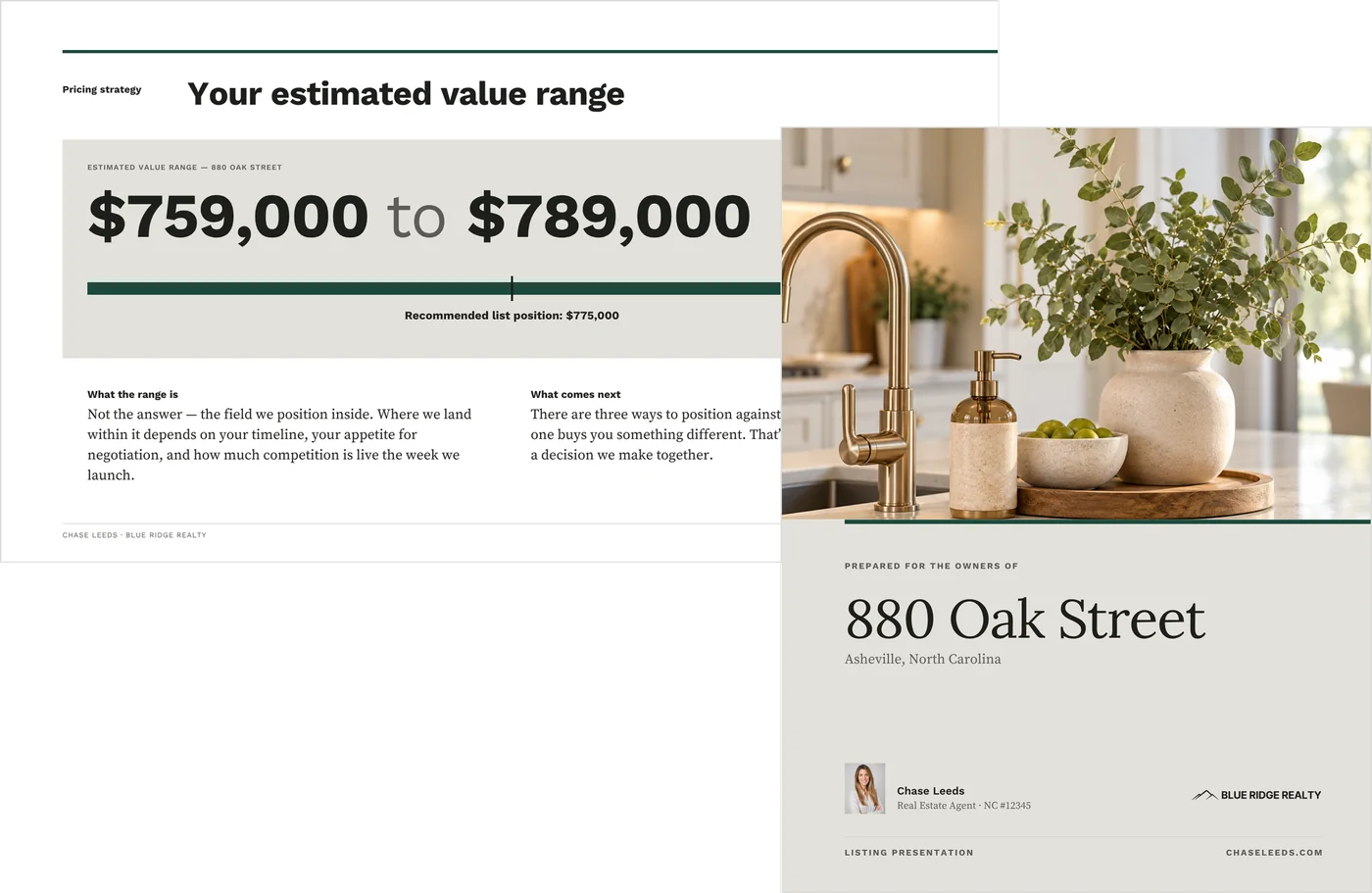
The portrait puts the comps and the value range on one page the seller can study on paper. The widescreen gives the value range a slide of its own, so the number lands on screen before the three positions do.
Present the 16:9 on screen, and print the 8.5 × 11 to leave behind.

Page 6 of the leave-behind, and slides 6 and 7 of the deck. The comps and range are a worked example, not a valuation of any home.
The leave-behind, all 18 pages
Shown as the worked example it ships with. The deck carries the same pages as 19 slides, and the marketing frames on page 11 ship empty, for pieces from your own recent listings.

Inside: the three positions, the cost of starting high, and the fee
Pages seven, eight and seventeen, at a size you can actually read.


Why your track record waits until page fifteen
The pricing case is built from market evidence and comparable sales first. By the time you reach the fee, the seller has already seen the evidence it is charged against.
The comps
Page six. A comparable-sales table with the seller’s home in the last row, and a value range built from it.
Three positions
Page seven. Above, at and just below the market, with what each one buys and what it risks.
The launch position
Page nine. The price position, list price, prep priorities and key dates, filled in together. Every later update is measured against it.
The fee, plainly
Page seventeen. What the fee covers and when you get paid, with compensation stated as negotiable and agreed in writing.
Three alternate pages, fully designed
Each alternate sits at the back and carries the number of the page it takes over, so a swap needs no renumbering and the presentation is the same length either way. Which pair you use depends on what you want to put in front of this seller, not on what you have.
The cover.
The default runs the photograph included with the template. The alternate is type-led, for a cover with no image.
The marketing page.
The default holds frames for pieces from your own recent listings. The alternate shows how the plan runs from prep to close, phase by phase, and needs no images.
The track-record page.
The default leads with your results. The alternate leads with four commitments a seller can check before they list and measure you against afterward.

Defaults on top, alternates below. The marketing frames are shown filled as an example; they ship empty.
Setup is find-and-replace, your comps and one color
1. Add your details.
Find and replace your name and title, brokerage, license number, phone, email and website. Add your headshot, your brokerage logo and the property address on the cover.
2. Set the brand color.
Both files ship with a bright magenta accent. Select one accent, use Change all, and the whole file moves to your color in one pass. Any magenta left behind marks a missed accent.
3. Enter the market and the comps.
Add the market figures and three to six comparable sales for this property, with the seller’s home in the last row. Then set the value range and the three price positions.
4. Choose your pages.
Pick your cover, marketing page and track-record page, and delete the ones you are not using.

As it downloads, and after the brand color is set.
Your identity, branding and page choices are set once. For each appointment you update the address, the market data, the comps, the value range and the list position.
Canva Free, two sizes, and what it doesn’t do
Everything edits on Canva’s free plan, including the one-pass color change. Headshots read best at 600px or more on the short side, the cover photo at 2500px wide, and listing photos at 1200px wide.
A few pages have working limits, noted in Canva where you need them: three to six comparable sales, a testimonial of two to three sentences, and a property address of about thirty characters.
It is a static template: it does not connect to MLS data, a CRM or live data, and it does not include a completed CMA. It is a digital download, and nothing physical ships.
Before you present it to a seller
This is an editable Canva template, not a market analysis and not a service. It does not include a completed CMA, custom design work, or brokerage-specific agency or legal language.
The comparable sales, value range and pricing figures ship as a worked example. They are illustrative only: not benchmarks, not typical of any market, and not a valuation of any home.
The fee page states that compensation is negotiable and agreed in writing. Fee, agency and disclosure requirements vary by state and by brokerage.
Good to know before the appointment
- Replace every figure with your own verified local data
- Fill the marketing frames only with pieces from your own listings, or use the phase-plan alternate
- Read the first-person commitments on communication, marketing and showings as your own words, and edit anything you would not personally promise
- Review the fee page and the process pages against your own forms and your broker’s policy
- Replace the sample agent name, brokerage, license number and contact details
What to send before, what to send after, and the buyer side
Each is sold separately, and this presentation needs none of them.
Pre-Listing Packet
What you send before the appointment, so the seller arrives already informed.
Weekly Seller Update
What you send after the home is live, week by week.
Buyer Presentation
The buyer-side counterpart, built on the same architecture and set up the same way.
Common questions
Do I get both the deck and the printed version?
Yes. You get two Canva template links, built from one master and carrying the same content in the same order.
Does it include a CMA?
No. The comps page is built for your own comparable sales. The figures it ships with are a worked example to replace.
I don’t have a long sales history. Does it still work?
Yes. Move in the track-record alternate, which leads with four commitments a seller can check before they list, and delete the default.
Do I need Canva Pro?
No. Both files edit on Canva’s free plan, and the one-pass color change works there too.
Open the appointment on the seller’s terms
A deck for the screen and a leave-behind for the table, from one purchase, built to put the evidence ahead of your credentials.