
Editable Canva Template for Real Estate Agents
Seller Reporting System
Show sellers what the market did — and what you did about it.
Report against the plan you set at the listing appointment: a Launch Report after week one, a Weekly Seller Update while the home is active, and a Final Report after closing — with the marketing work you did on the page, not just the showings.
$18 · One-time purchase
Launch → Weekly → Final, plus four add-on reports · 8.5 × 11 · Canva Free · Instant download
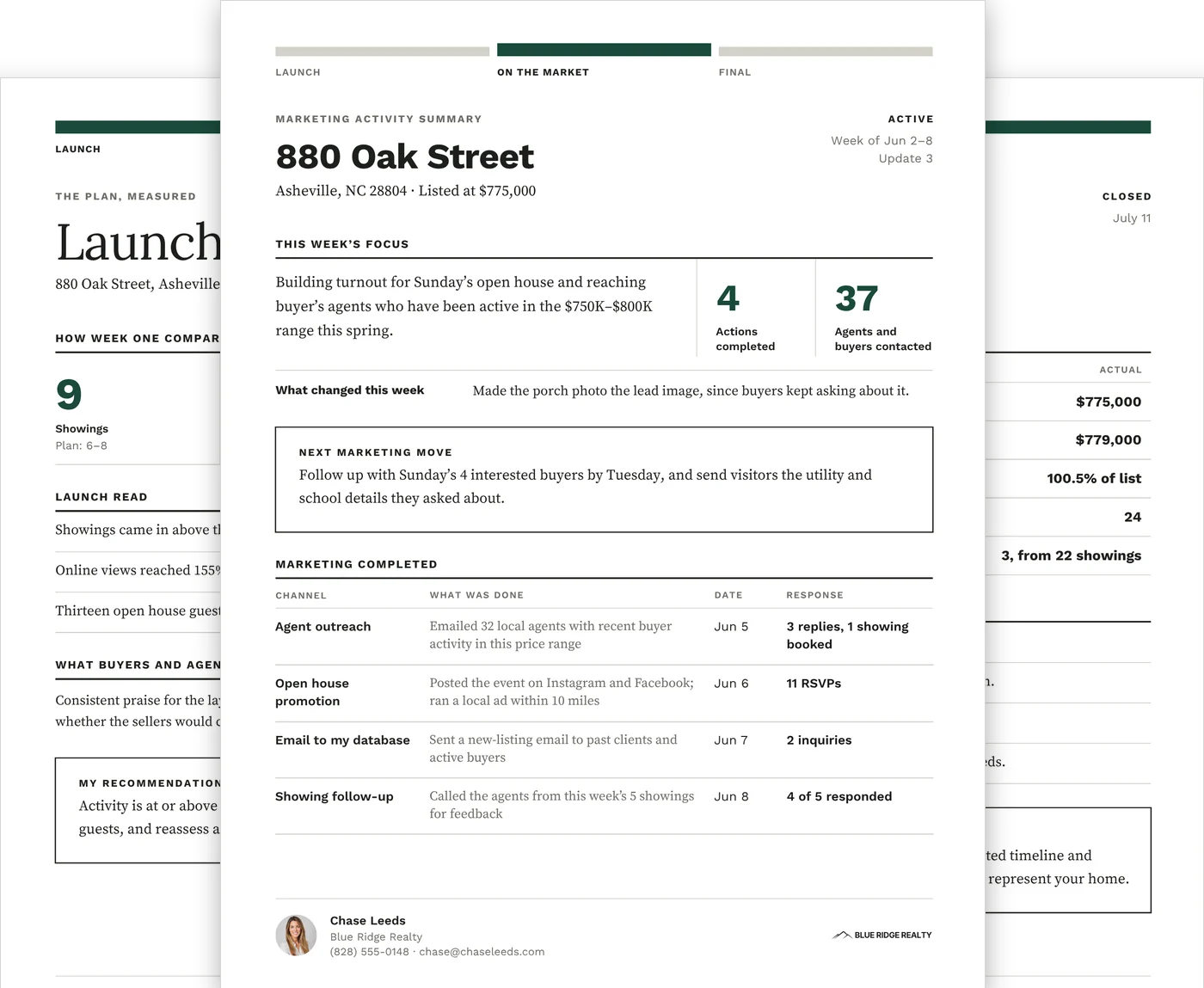
Three reports carry every listing. Four more when the week calls for them.
One editable Canva template, 8.5 × 11 portrait. A Quick Start Guide covers when to send each report, setup, chart editing and a short check before you send.
Every listing
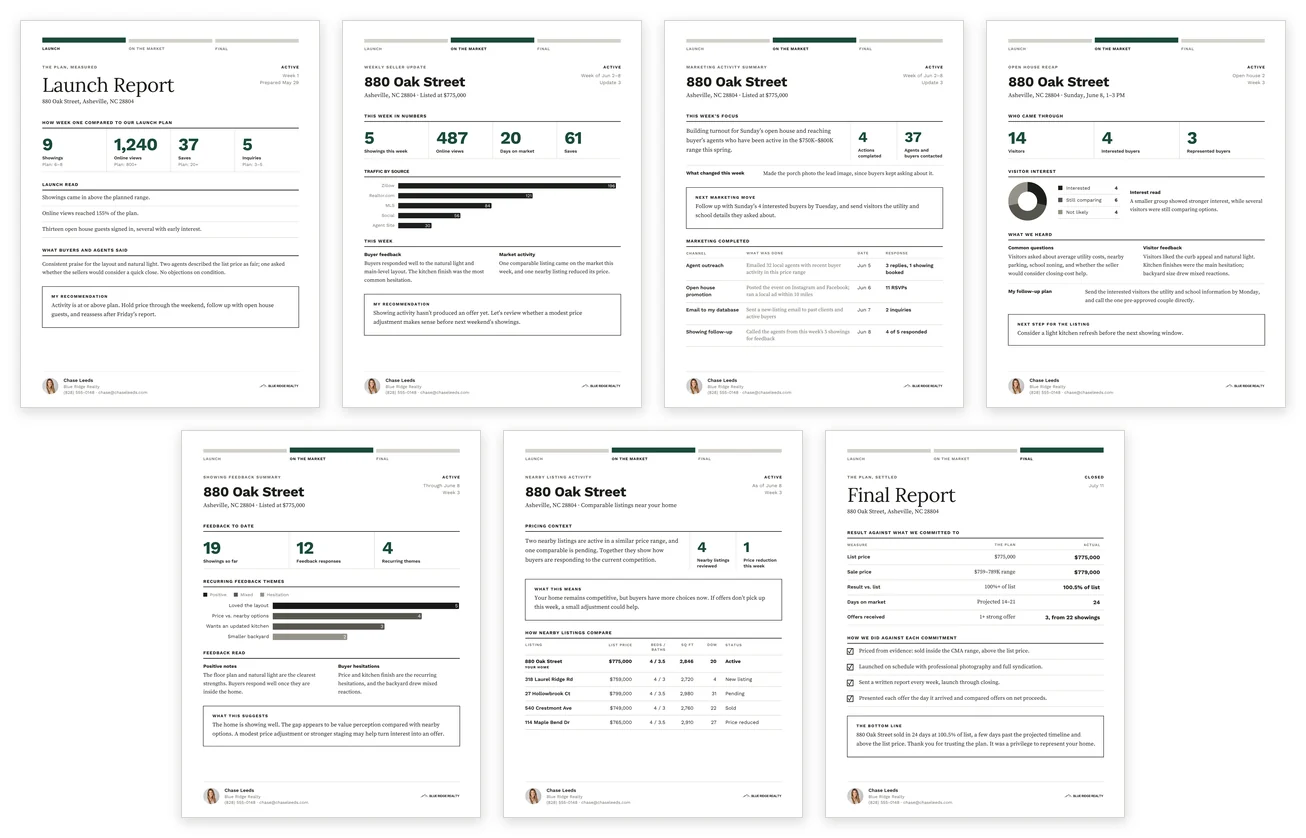
- Launch Report — sent at the end of launch week. Week-one showings, online views, saves and inquiries next to the targets you set, what buyers and agents said, and your recommendation for the plan
- Weekly Seller Update — sent each week the home is active. Showings, views, days on market, saves, traffic by source, buyer feedback, market activity and your recommendation
- Final Report — sent after closing. List price, sale price, result against list, days on market and offers received, each set against the plan, a checklist of the commitments you made to the seller, and a closing note to your seller
When the listing calls for it
- Marketing Activity Summary — when you want to show the work behind the listing. The week’s focus, actions completed, agents and buyers contacted, what changed on the listing, your next move, and a table of each channel, what was done, the date and the response
- Open House Recap — after an open house. Visitors, interested and represented buyers, an interest chart, common questions, feedback, your follow-up plan and the next step
- Showing Feedback Summary — once feedback starts repeating. Cumulative showings, feedback responses, recurring themes in a chart, positive notes, hesitations, and what the pattern suggests
- Nearby Listing Activity — when the competition changes. Pricing context, a table comparing the home with four nearby listings, and what the competition means for your seller
Send the three on schedule; add the others when they answer a question your seller is asking.
Inside: the marketing you did, the competition, and the result
Three of the reports, at a size you can actually read.
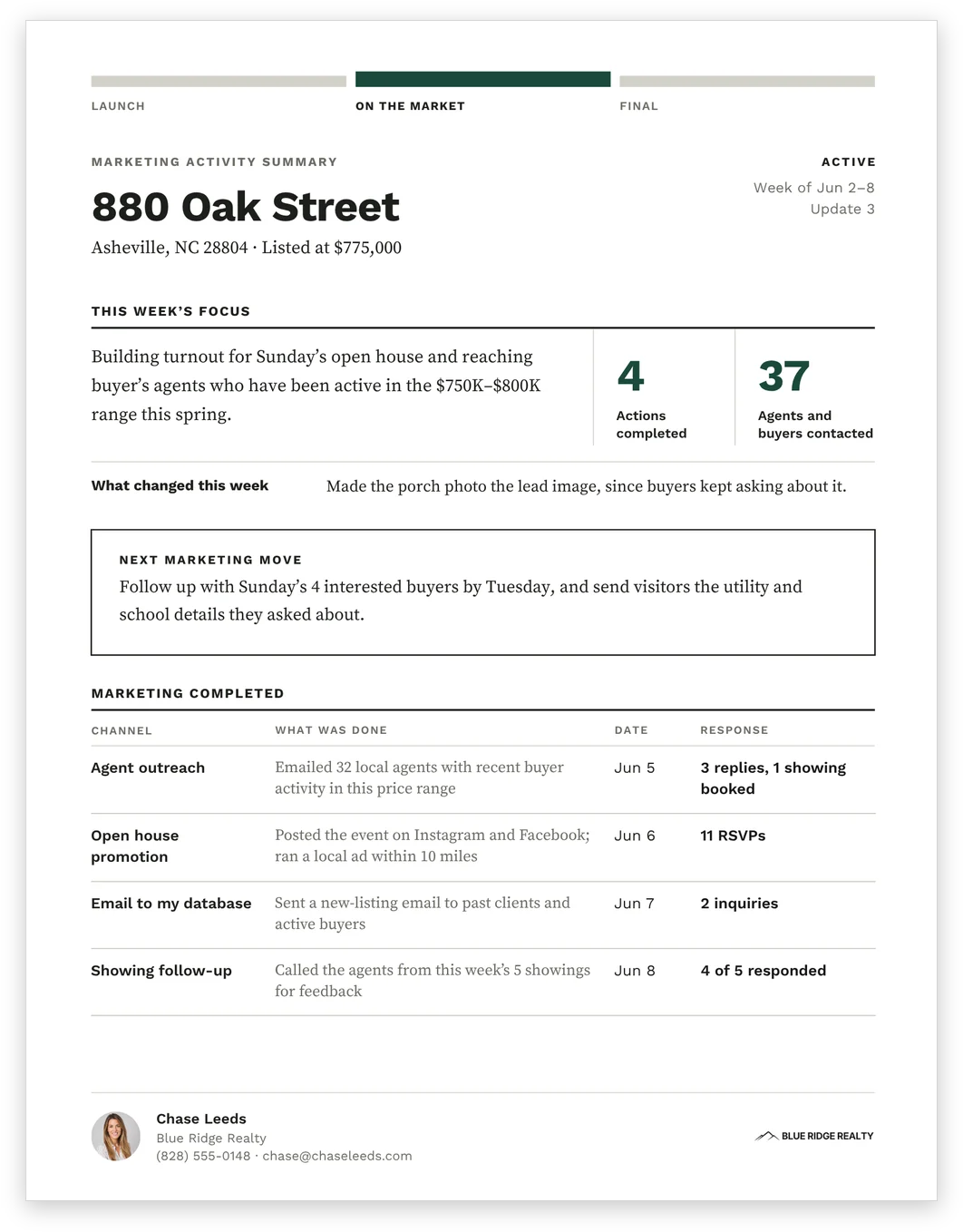
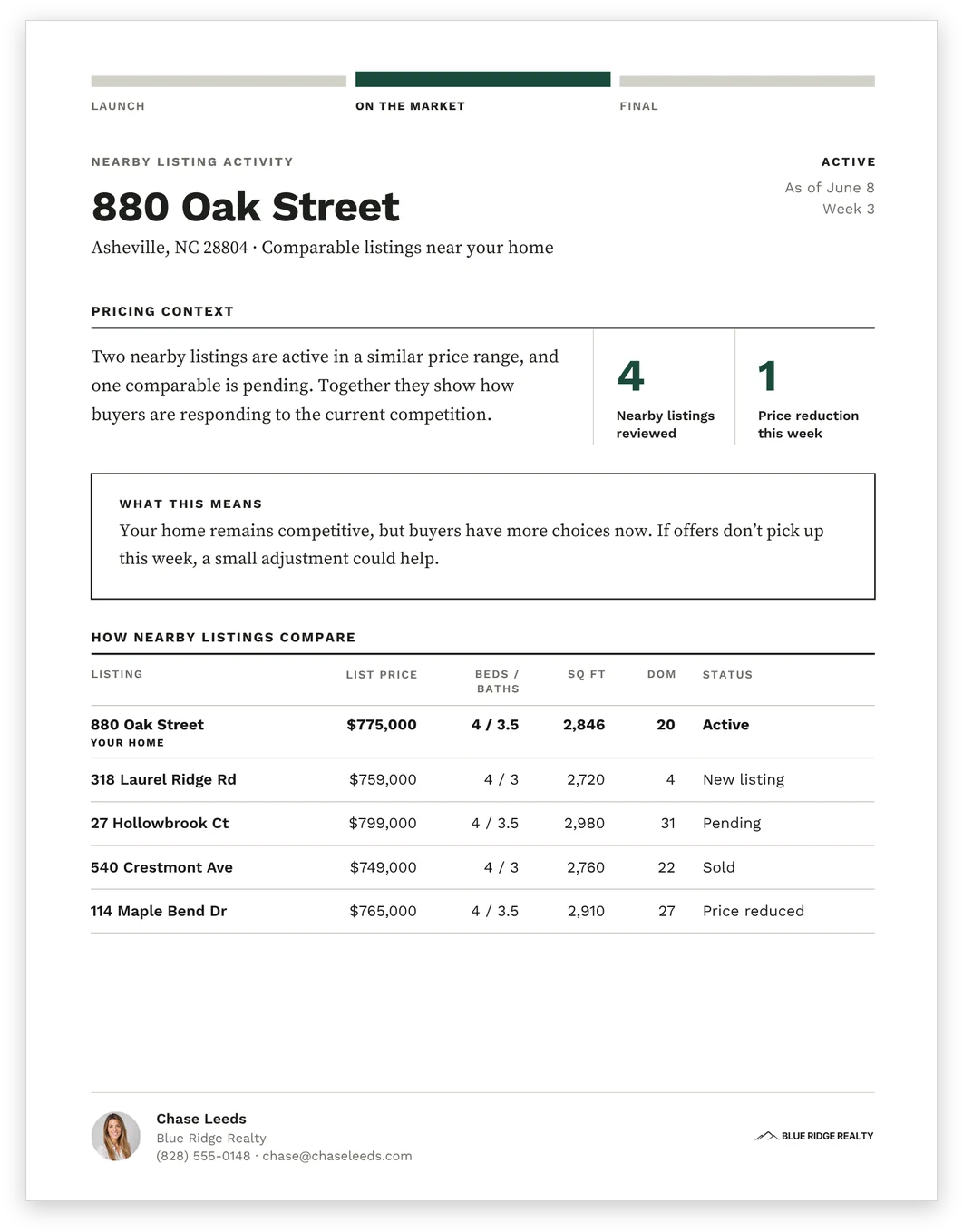
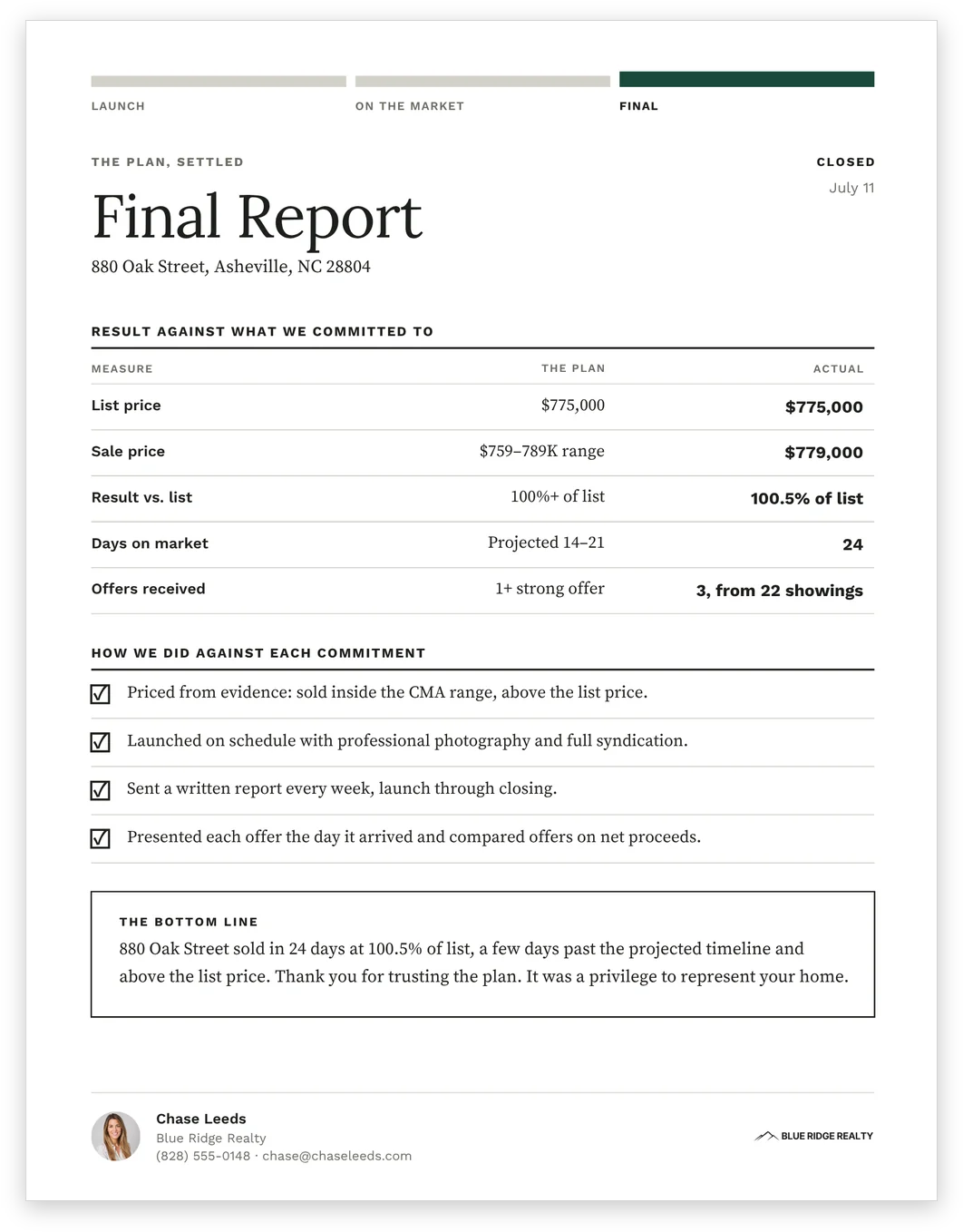
Sample pages. The address, agent, brokerage and every figure shown are demonstration content you replace.
What a seller sees that most updates leave out
Most seller updates cover showings and views. These follow one line from the listing appointment to closing: plan → market response → your work → recommendation → result.
Your side of the week
The Marketing Activity Summary lists the agent outreach, open house promotion, database emails and showing follow-up you did, with the date and the response for each one.
The plan, measured
The Launch Report sets week one against the targets you agreed. The Final Report closes the loop: list price, sale price, days on market and offers, each against the plan, and a checklist of the commitments you made to the seller.
Patterns, not anecdotes
The Showing Feedback Summary turns repeated comments into recurring themes, so a price conversation rests on what buyers keep saying.
The competition
The Nearby Listing Activity report puts the home beside four nearby listings on price, size, days on market and status, with what that means for the seller.
The full set, filled in
Shown filled in with a sample listing. The reports arrive blank and ready to edit.
Best for listing agents who report on every listing
You want every seller report to look the same from launch week to closing, and you want the seller to see the marketing work alongside the market response.
A good fit if you:
- send a seller update every week a home is active, and want a set that covers the other moments too
- want to show the outreach, promotion and follow-up you did, not only showings and views
- report against a plan you set at the listing appointment
- would rather fill in fields than rebuild a report each week
Not ideal if:
- you only need weekly reporting while the home is active — the Weekly Seller Update covers the weekly, open house, showing feedback and nearby listing reports on its own
- you want reports that fill themselves in — this is a manual template, and nothing connects to MLS data, a portal, a CRM or a spreadsheet
Set it up once, then fill in the week
1. Open the Canva link.
It is in the PDF that comes with your download.
2. Add your details.
Your name, brokerage, contact details, headshot and logo.
3. Set your brand color.
Once. It updates across every report.
4. Report.
Enter that week’s numbers and notes, and edit the charts and tables.
5. Send it.
Download as a PDF and send it to your seller.
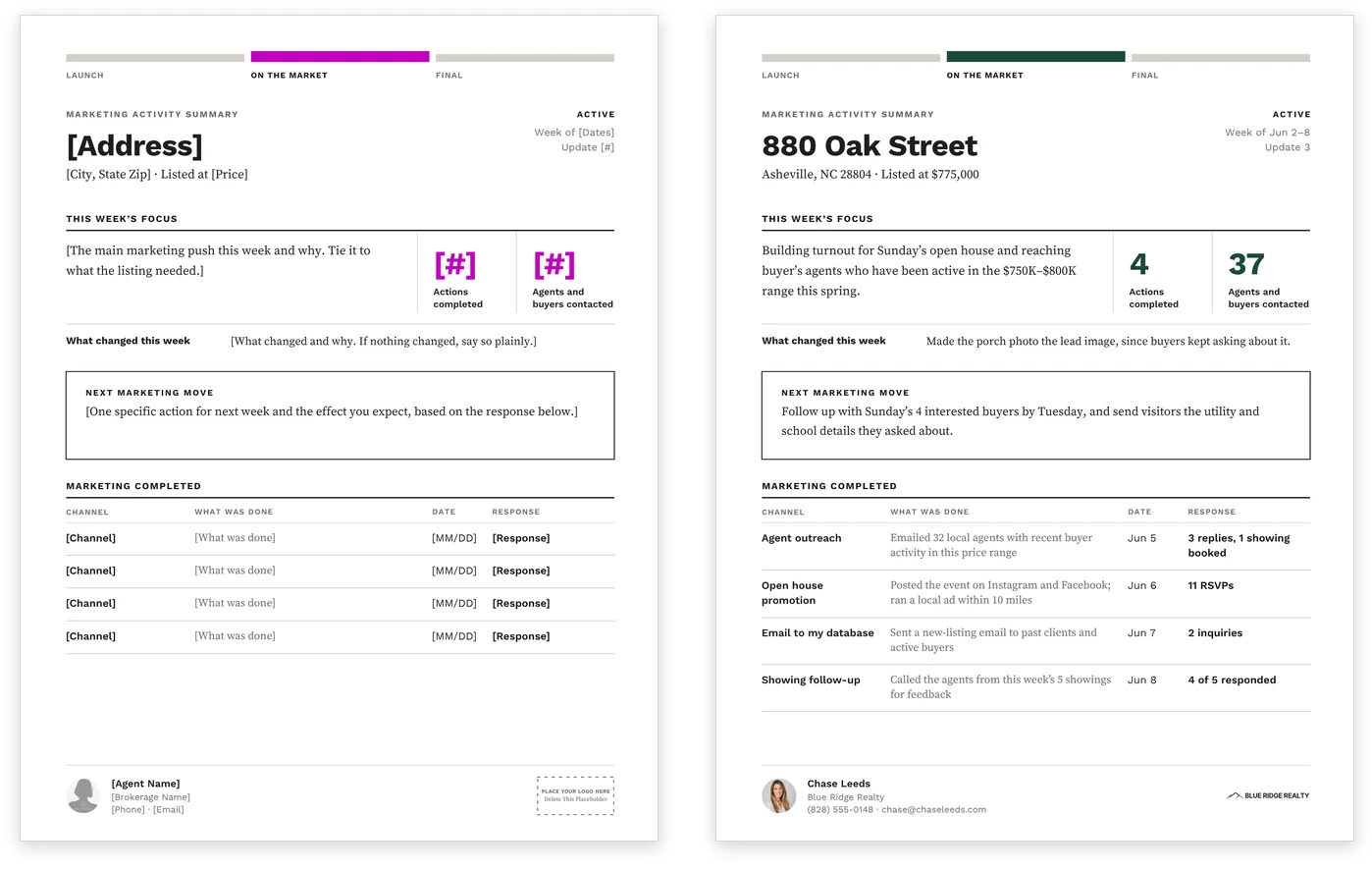
As it arrives, and filled in.
What to know before you buy
A manual Canva reporting system. Market data, notes, chart values, comparable listings and recommendations are entered by you. It doesn’t connect to MLS data, listing portals, a CRM or Google Sheets.
Everything edits on Canva’s free plan. The charts and tables are edited in Canva too, and the Quick Start Guide shows where to change chart values and labels, and how to add or remove table rows.
The sample images show a filled-in example; the reports arrive blank and ready to edit. It is a digital download, and nothing ships.
Before a report goes to your seller
The address, agent, brokerage and every figure in the samples are demonstration content. Replace them with the listing’s own.
Check all market data, comparable listings and pricing notes against your brokerage’s requirements before sending a report.
Good to know before you send
- Replace the sample agent name, brokerage and contact details
- Check the figures and the comparable listings against the MLS
- Update the charts as well as the numbers beside them
- Read the recommendation in your own voice before it goes out
- Make sure every checked commitment on the Final Report is true for this seller
- Export the PDF and read it through once
Set the plan, then report against it
Agree the plan at the appointment with the Listing Presentation. Its launch-position page records the price position, prep priorities, key dates and what each market signal means you will do. That is the plan the Launch Report and the Final Report measure the listing against.
Same design as the Seller Checklists, so the checklists your seller works through and the reports you send look like one set.
Only need reporting for the weeks the home is active? The Weekly Seller Update is the lighter option. Each is sold separately, and this set needs neither.
Common questions
How is this different from the Weekly Seller Update?
The Weekly Seller Update covers the weeks a home is active: the weekly report, the open house recap, showing feedback and nearby listings. This set adds the Launch Report, the Marketing Activity Summary and the Final Report, so the listing is reported from launch week through to closing.
Does it pull my numbers from the MLS?
No. It is a manual Canva template, and it does not connect to MLS data, listing portals, a CRM or Google Sheets. You type in the week’s figures and notes.
Do I have to send every report?
No. Three carry every listing: the Launch Report at the end of launch week, the Weekly Seller Update each week the home is active, and the Final Report after closing. Add the Marketing Activity Summary, Open House Recap, Showing Feedback Summary or Nearby Listing Activity when one answers a question your seller is asking.
Do I need Canva Pro?
No. It works with Canva Free, including the single change that sets your accent color across every report.
Report the whole listing, not just the week.
One report trail from launch week to closing, measured against the plan you set.